



Digispark ATtiny85 Development Board — Arduino Compatible Microcontroller
Digispark ATtiny85 Development Board — Arduino Compatible Microcontroller
Couldn't load pickup availability
💡 Overview
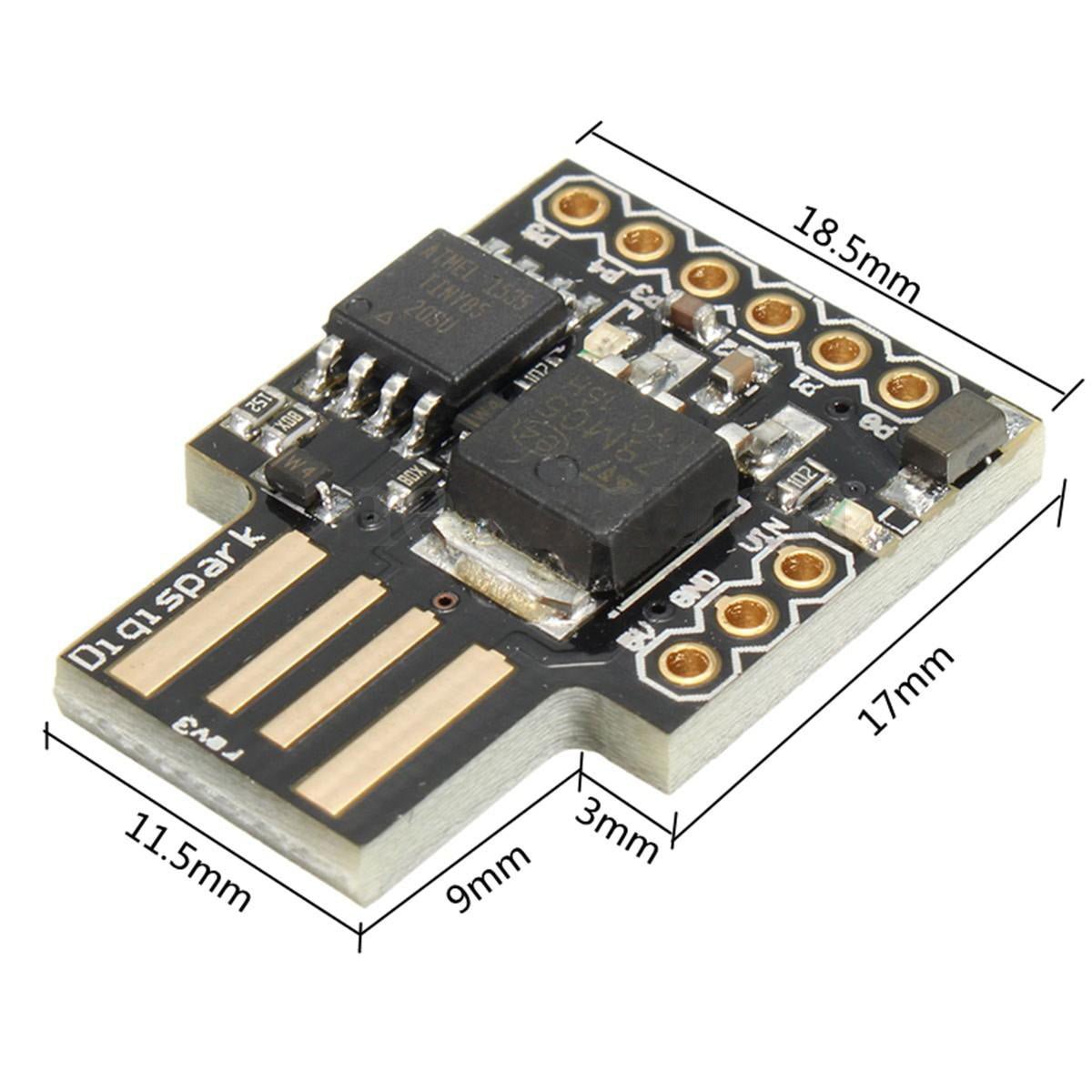
The Digispark ATtiny85 is a tiny, Arduino-compatible development board built around the Atmel/Microchip ATtiny85 microcontroller. Despite being smaller than a quarter, it features a built-in USB-A plug, an on-board voltage regulator, and the Micronucleus USB bootloader — letting you program it directly from the Arduino IDE without a separate programmer. Just plug it into any USB-A port, upload your code, and you're running.
⭐ Key Features
- Ultra-Compact Design — Smaller than a quarter, perfect for embedding into tight spaces and portable projects
- Built-In USB-A Plug — Plugs directly into any USB-A port for programming and power — no cables needed
- Arduino IDE Compatible — Program using the familiar Arduino IDE with Digistump board support
- Micronucleus USB Bootloader — No external programmer required; upload sketches directly over USB
- 6 I/O Pins — Supports digital I/O, PWM (3 pins), and analog input (4 channels)
- On-Board LED — Built-in LED on pin P1 for easy testing and debugging
- On-Board 5V Regulator — Can also be powered via VIN pin (7–12V) for standalone projects
- USB HID Capable — Can emulate USB keyboards, mice, and other HID devices
📋 Specifications
| Parameter | Value |
|---|---|
| Microcontroller | Microchip ATtiny85 |
| Architecture | 8-bit AVR |
| Clock Speed | 16.5 MHz (internal PLL) |
| Flash Memory | 8 KB (~6 KB available after bootloader) |
| SRAM | 512 bytes |
| EEPROM | 512 bytes |
| Digital I/O Pins | 6 (P0–P5) |
| PWM Outputs | 3 (P0, P1, P4) |
| Analog Input Channels | 4 (P2, P3, P4, P5) |
| Operating Voltage | 5V |
| Input Voltage (VIN) | 7–12V |
| USB Interface | Built-in USB-A plug (USB 1.1 Low Speed) |
| Bootloader | Micronucleus (V-USB based) |
| On-Board LED | Yes — connected to P1 |
| Board Dimensions | Approx. 25 × 18 mm (0.98 × 0.71 inches) L × W |
📌 Pin Configuration
| Pin | Digital I/O | PWM | Analog In | Special Function |
|---|---|---|---|---|
| P0 | Yes | Yes | — | SDA (I2C), MOSI (SPI) |
| P1 | Yes | Yes | — | MISO (SPI), On-Board LED |
| P2 | Yes | — | A1 | SCL (I2C), SCK (SPI) |
| P3 | Yes | — | A3 | USB D+ |
| P4 | Yes | Yes | A2 | General Purpose (safest pin) |
| P5 | Yes | — | A0 | RESET (do not reconfigure) |
🎯 Typical Applications
- USB HID devices — custom keyboards, macros, shortcuts, and mouse emulators
- LED controllers and RGB lighting effects
- Sensor data logging (temperature, light, humidity)
- Wearable electronics and compact embedded projects
- Home automation triggers and IoT sensor nodes
- Educational projects and learning Arduino programming
- Rapid prototyping of simple control circuits
📦 What's in the Box
- 1 × Digispark ATtiny85 Development Board (USB-A)
- Header pins (require soldering)
⚠️ Important Notes
- The Digispark uses a unique upload process: click Upload in the Arduino IDE first, then plug in the board when prompted. The bootloader only listens for new code for ~5 seconds after power-on. See the User Guide for more details and extensive programming instructions
- Windows users must install Digistump USB drivers before first use. See the User Guide for instructions.
- The ATtiny85 does not have a hardware UART — the standard Arduino Serial Monitor is not available.
- With ~6 KB of usable flash memory, keep sketches small and avoid large libraries.
- Pin P5 is the RESET pin. Reconfiguring it as I/O will permanently disable USB programming.
- For best results, use a USB 2.0 port. Some USB 3.0 controllers may have compatibility issues with low-speed USB devices.
📄 Documentation & Resources
For detailed setup instructions, Arduino IDE configuration, driver installation, wiring diagrams, and example projects, see our comprehensive User Guide:
Sold and supported by Envistia Mall. Ships from the USA. For wiring diagrams and troubleshooting, see the User Guide. The manufacturer and Envistia LLC (dba Envistia Mall) are not responsible for any damages or losses resulting from the use of this product. Always follow proper electrical safety practices when working with electronic components. Specifications are based on manufacturer data and are subject to change without notice.
Share


Some people said they were having trouble setting up the usb, but I got through with it in one night. It was fun for a week then I got bored. Still a good product though.