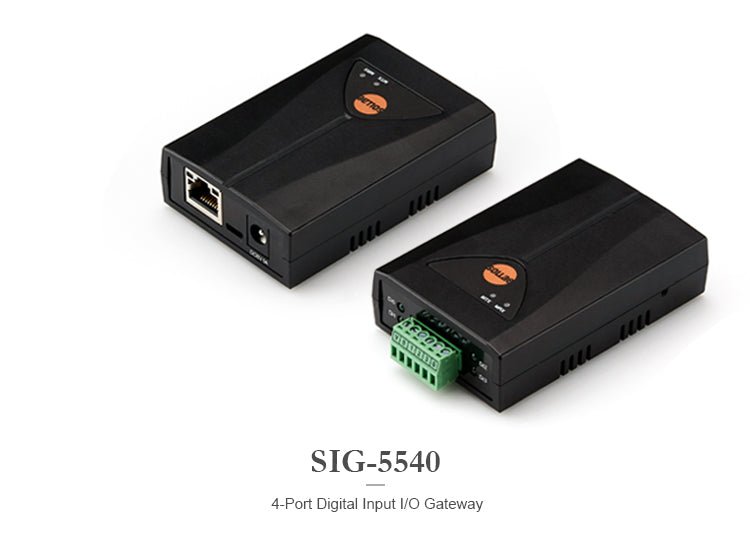
Sollae Systems SIG-5540 4-Port Digital Input Ethernet I/O Gateway with Modbus/TCP
Sollae Systems SIG-5540 4-Port Digital Input Ethernet I/O Gateway with Modbus/TCP
Couldn't load pickup availability
Monitor digital sensors and switches across your network with the Sollae Systems SIG-5540, a professional-grade digital input Ethernet gateway that transforms traditional on/off sensors into intelligent, network-connected devices.
Whether you're monitoring door sensors, limit switches, push buttons, or any digital signal source, the SIG-5540 makes it simple to integrate these inputs into your SCADA system, HMI, or monitoring platform using the industry-standard Modbus/TCP protocol.
What Makes the SIG-5540 Essential for Digital Monitoring?
The SIG-5540 eliminates the complexity of digital input integration. Instead of running individual wires back to your control room, simply connect your sensors to the gateway, plug in an Ethernet cable, and access real-time status from anywhere on your network. It's that straightforward.
Key capabilities:
- 4 independent digital input ports supporting wet contact, dry contact, NPN, and PNP sensors
- Built-in counter function on each port for counting events like door openings, production cycles, or pulses
- Modbus/TCP protocol for seamless integration with virtually any industrial control system
- Industrial temperature range from -40°C to +85°C for reliable operation in harsh environments
- Multiple simultaneous connections supporting up to 4 TCP sessions at once
- Wide voltage input range from 4.5V to 25V for flexible sensor compatibility
SIG-5540 TECHNICAL SPECIFICATIONS
Digital Input Capabilities
- Number of Ports: 4 independent channels
-
Input Types:
- Wet Contact (powered sensors)
- Dry Contact (switch closures)
- NPN Transistor outputs
- PNP Transistor outputs
- Input Voltage Range: 4.5V to 25V DC
- ON Threshold: Higher than 4.5V DC
- OFF Threshold: Lower than 1V DC
- Terminal Block: 3.5mm pitch, 6-pole screw terminals
- Counter Function: Configurable trigger on rising edge, falling edge, or both
- Signal Validation Time: 100-30,000ms (adjustable to filter noise)
Network Interface
- Ethernet: 10/100 Mbps auto-sensing (RJ45)
- Cable Support: Straight-through or crossover cables (auto-detect)
- Protocols: Modbus/TCP, TCP/UDP, ICMP, DHCP, mDNS, SSL/TLS
- IP Support: IPv4/IPv6 dual stack
- Connections: Up to 4 simultaneous TCP sessions
- Default Port: 502 (Modbus/TCP standard)
- Connection Modes: TCP Server or TCP Client
Power Requirements
- Input Voltage: DC 5V ±0.5V
- Current Draw: Typically 284mA
- Protection: Reverse voltage and surge protection built-in
Physical Specifications
- Dimensions: 94mm × 57mm × 24mm (3.7" × 2.2" × 0.9")
- Weight: Approximately 64g (2.3 oz)
- Mounting: Compact design for DIN rail or panel mounting
Environmental
- Operating Temperature: -40°C to +85°C (-40°F to +185°F)
- Storage Temperature: -40°C to +85°C (-40°F to +185°F)
Indicators
- LEDs: RUN (system status), LINK (network connection), MTX (transmit), MRX (receive), Di0, Di1, Di2, Di3 (individual port status)
Certifications & Compliance
- CE: EMC 2014/30/EU, RoHS 2011/65/EU
- FCC: Part 15 Subpart B, Class A
- KC: Registration (KN 32, KN 35)
WHAT'S INCLUDED
- SIG-5540 4-Port Digital Input I/O Gateway
- Quick Start Guide
- Free spFinder configuration software (download from manufacturer)
- Free ModMap mobile app for iOS and Android
All software is available for download from the Sollae Systems ezTCP website. See the link under the Technical Support & Resources section below.
Note: Power supply (5V DC), Ethernet cable, and sensors sold separately
KEY FEATURES & BENEFITS
Universal Digital Input Compatibility
The SIG-5540 accepts virtually any digital signal type. Whether you're working with powered sensors (wet contact), simple switches (dry contact), or transistor outputs (NPN/PNP), this gateway handles them all. The wide 4.5V-25V input range ensures compatibility with most industrial sensors.
Intelligent Counter Function
Each digital input port includes a built-in counter that tracks state changes. Configure each counter to trigger on rising edges (off-to-on), falling edges (on-to-off), or both. Perfect for counting production cycles, door openings, pulses from flow meters, or any event-based monitoring.
True Industrial-Grade Reliability
With an operating temperature range from -40°C to +85°C, the SIG-5540 handles extreme environments that would disable consumer-grade equipment. Built-in reverse voltage and surge protection safeguard your investment against electrical faults.
Modbus/TCP Native Support
No protocol conversion needed. The SIG-5540 speaks Modbus/TCP natively, making integration with PLCs, SCADA systems, and HMIs completely straightforward. Access your digital input states and counter values using standard Modbus function codes.
Multiple Simultaneous Connections
Support up to 4 concurrent TCP sessions, allowing your HMI, SCADA system, data logger, and monitoring software to all access the gateway simultaneously without conflicts. Each connection can independently read input states and counters.
Smart Internet Switch Functionality
Configure the gateway to communicate directly with other networked devices without requiring a central HMI. When a digital input changes state, the gateway can trigger actions on other Modbus/TCP devices—enabling distributed automation without complex programming.
Easy Configuration & Monitoring
The included spFinder software provides an intuitive interface for:
- Device discovery on your network
- Complete configuration management
- Real-time monitoring of all digital inputs and counters
- Viewing connection status and statistics
- Firmware updates (online or manual)
- Export/import of configuration settings
Mobile Monitoring with ModMap
The free ModMap app (iOS and Android) lets you monitor your digital inputs from your smartphone or tablet. Perfect for quick status checks or remote troubleshooting without needing a laptop.
Adjustable Signal Validation
Configure the signal validation time (100-30,000ms) to filter out electrical noise and contact bounce. This ensures only legitimate state changes are registered, preventing false triggers from unstable signals.
TYPICAL APPLICATIONS
Industrial Automation
Monitor limit switches, proximity sensors, push buttons, and emergency stops in manufacturing environments. Track production counts and machine cycles.
Access Control & Security
Monitor door sensors, motion detectors, glass break sensors, and alarm contacts. Count entries and exits for occupancy tracking.
Building Automation
Track window/door status, occupancy sensors, smoke detectors, and HVAC status switches in smart building systems.
Process Monitoring
Monitor pump status, valve positions, tank level switches, and equipment run status in industrial processes.
Energy Management
Track equipment on/off states, circuit breaker status, and power availability across electrical distribution systems.
Transportation & Logistics
Monitor gate positions, vehicle presence sensors, conveyor status, and package counting in warehousing and distribution.
Environmental Monitoring
Track alarm conditions, equipment failures, and threshold violations in remote monitoring stations.
SETUP & CONFIGURATION
Getting Started in 5 Simple Steps:
-
Power Connection
- Connect a 5V DC power supply to the 2-pole power terminal
- Observe the RUN LED to confirm power-up
-
Sensor Wiring
- Connect your digital sensors to the 6-pole terminal block
- Wire according to your sensor type (wet contact, dry contact, NPN, or PNP)
- Refer to the included wiring diagrams for proper connections
-
Network Connection
- Connect an Ethernet cable from your network to the RJ45 port
- The gateway supports both DHCP (automatic IP) and static IP addressing
- Observe the LINK LED to confirm network connection
-
Configuration
- Download and install the free spFinder software
- Search for the device on your network
- Log in (default ID: sig-5540, password: sig-5540)
- Configure network settings, TCP parameters, and counter settings
-
Integration
- Access digital input states and counters via Modbus/TCP from your SCADA system or monitoring software
- Use standard Modbus function codes to read registers
Default Settings:
- Login ID: sig-5540
- Password: sig-5540 (change immediately for security)
- Network: DHCP enabled by default
- TCP Port: 502 (Modbus/TCP standard)
- Connection Mode: TCP Server
- Counter Trigger: Rising edge (all ports)
- Valid Time: 100ms
WIRING DIAGRAMS
The SIG-5540 supports four common digital input types:
Wet Contact (Powered Sensors)
Connect sensors that provide their own voltage output (4.5V-25V). Common with industrial proximity sensors and photoelectric sensors.
Dry Contact (Switch Closures)
Connect simple switches, relay contacts, or push buttons. The gateway provides the necessary voltage through internal pull-up resistors.
NPN Transistor Outputs
Connect sensors with NPN open-collector outputs (sinking). Common with many Asian-manufactured sensors.
PNP Transistor Outputs
Connect sensors with PNP open-collector outputs (sourcing). Common with European-manufactured sensors.
Complete wiring diagrams for all input types are included in the user manual.
MODBUS REGISTER MAP
The SIG-5540 provides comprehensive data access through Modbus/TCP registers:
Read-Only Registers:
- Digital Input Status - Current state of each input (0=OFF, 1=ON)
- Inverted Digital Input Status - Inverted state for reverse logic applications
- Digital Input Port Counters - 32-bit counter value for each port
- Device Information - Model, firmware version, uptime, network status
Read/Write Registers:
- Reset Digital Input Port Counter - Clear counter values
- Notification Enable - Configure event notifications (basic and extended)
Complete register addresses and function codes are detailed in the included user manual.
COUNTER FUNCTION DETAILS
Each digital input port includes a sophisticated counter with configurable triggering:
Trigger Modes:
- Rising Edge: Count when input transitions from OFF to ON
- Falling Edge: Count when input transitions from ON to OFF
- Both Edges: Count on any state change
Signal Validation:
Configure the minimum signal duration (100-30,000ms) required for a valid state change. This filters out:
- Contact bounce from mechanical switches
- Electrical noise and transients
- Unstable sensor outputs
- EMI-induced false triggers
Counter Range:
Each counter is a 32-bit value, allowing counts from 0 to 4,294,967,295 before rolling over.
Counter Reset:
Counters can be reset individually or all at once via Modbus write commands.
ADVANCED FEATURES
Internet Switch Functionality
The SIG-5540 can communicate directly with other Modbus/TCP devices without requiring a central HMI. Configure the gateway to monitor its digital inputs and trigger actions on remote devices when conditions are met.
Example: When a door sensor (digital input) detects an opening, the gateway can automatically send a command to a relay module to turn on lights—all without involving a PLC or SCADA system.
Security Features
- Password Protection: Secure access to configuration settings
- SSL/TLS Support: Encrypted communications for sensitive data
- Remote Access Control: Enable/disable remote configuration as needed
- Local/Network Search Control: Restrict device discovery for security
Diagnostic Capabilities
- Real-time Statistics: Monitor TCP connection states, Modbus frame counts, and data throughput
- Communication Logging: Track all Modbus queries, responses, and errors via console
- LED Indicators: Visual feedback for power, network link, data transmission, and individual input states
- Connection Timeout: Configurable timeout (0-3600 seconds) for automatic connection termination
Flexible Connection Modes
- TCP Server Mode: Gateway listens for incoming connections (default)
- TCP Client Mode: Gateway initiates connections to a specified host
- Multiple Connection Support: Enable up to 4 simultaneous TCP sessions
COMPATIBLE SENSORS & DEVICES
The SIG-5540 works with any digital sensor or switch that outputs:
Wet Contact Sensors (4.5V-25V)
- Proximity sensors (inductive, capacitive, photoelectric)
- Limit switches with built-in power
- Reed switches with external power
- Hall effect sensors
- Photoelectric sensors
Dry Contact Devices
- Mechanical switches (toggle, push button, selector)
- Relay contacts
- Thermostat contacts
- Float switches
- Pressure switches
- Door/window sensors
NPN Transistor Outputs
- Asian-manufactured proximity sensors
- Photoelectric sensors (NPN type)
- Encoder outputs
- PLC digital outputs (NPN)
PNP Transistor Outputs
- European-manufactured proximity sensors
- Photoelectric sensors (PNP type)
- Safety sensors
- PLC digital outputs (PNP)
FREQUENTLY ASKED QUESTIONS
Q: Can I mix different sensor types on the same gateway?
A: Yes! Each of the 4 ports can be independently connected to wet contact, dry contact, NPN, or PNP sensors. The gateway automatically adapts to the signal type.
Q: What's the difference between wet contact and dry contact?
A: Wet contact sensors provide their own voltage output (4.5V-25V), while dry contact devices are simple switch closures that rely on the gateway's internal pull-up voltage. Think of wet contact as "powered sensors" and dry contact as "simple switches."
Q: How do I prevent false counts from switch bounce?
A: Use the Valid Time setting (100-30,000ms) to specify the minimum signal duration required for a valid state change. For mechanical switches, set this to 50-100ms to filter out bounce.
Q: Can I reset the counters remotely?
A: Yes, counters can be reset individually or all at once via Modbus write commands to the appropriate registers. You can also reset them through the spFinder software.
Q: What happens when a counter reaches its maximum value?
A: The 32-bit counter rolls over to 0 after reaching 4,294,967,295. For most applications, this provides effectively unlimited counting capacity.
Q: Can multiple devices access the gateway simultaneously?
A: Yes, the SIG-5540 supports up to 4 simultaneous TCP connections. Enable the Multiple Connection feature in the configuration to allow your HMI, SCADA system, data logger, and monitoring app to all connect at the same time.
Q: What software do I need to read the digital inputs?
A: Any Modbus/TCP client software will work. Popular options include ModScan, QModMaster, the free ModMap mobile app, or integration directly into your SCADA system (Ignition, Wonderware, etc.). The free spFinder software is used for configuration and monitoring.
Q: How do I access the gateway remotely over the internet?
A: Configure port forwarding on your router to forward external traffic to the gateway's IP address and port 502. For enhanced security, use a VPN connection instead of direct internet exposure. Remote access can be enabled/disabled in the security settings.
Q: What power supply do I need?
A: You need a regulated 5V DC power supply capable of at least 300mA (the gateway typically draws 284mA). Ensure the power supply is within the ±0.5V tolerance (4.5V to 5.5V).
Q: Can I use this outdoors?
A: The SIG-5540 operates reliably from -40°C to +85°C, but it should be installed in a weatherproof enclosure if used outdoors to protect against moisture and physical damage.
Q: What's the maximum cable length for digital inputs?
A: Cable length depends on the sensor type and environmental noise. For dry contact and wet contact sensors, 100 meters is typically safe. For NPN/PNP sensors, follow the sensor manufacturer's recommendations (usually 20-50 meters).
TECHNICAL SUPPORT & RESOURCES
SIG-5540 4-Port Digital Input I/O Gateway Product Page
SIG-5540 4-Port Digital Input I/O Gateway Datasheet
SIG-5540 4-Port Digital Input I/O Gateway User Manual
ModBus/TCP Protocol ezTCP Application Note
SIG Series I/O Applications (Internet Switch) Application Note
spFinder Management Program for Packageware Products (for Windows) Download
ModMap HMI Application for Remote I/O Gateway (Supports Modbus/TCP) Download
The SIG-5540 is designed for professional industrial applications. Basic networking knowledge and familiarity with Modbus/TCP protocol recommended for optimal deployment.
Share