USB Charger Doctor Inline Voltage and Current Meter Tester for Laptop Desktop USB Power
USB Charger Doctor Inline Voltage and Current Meter Tester for Laptop Desktop USB Power
Couldn't load pickup availability
📋 Overview
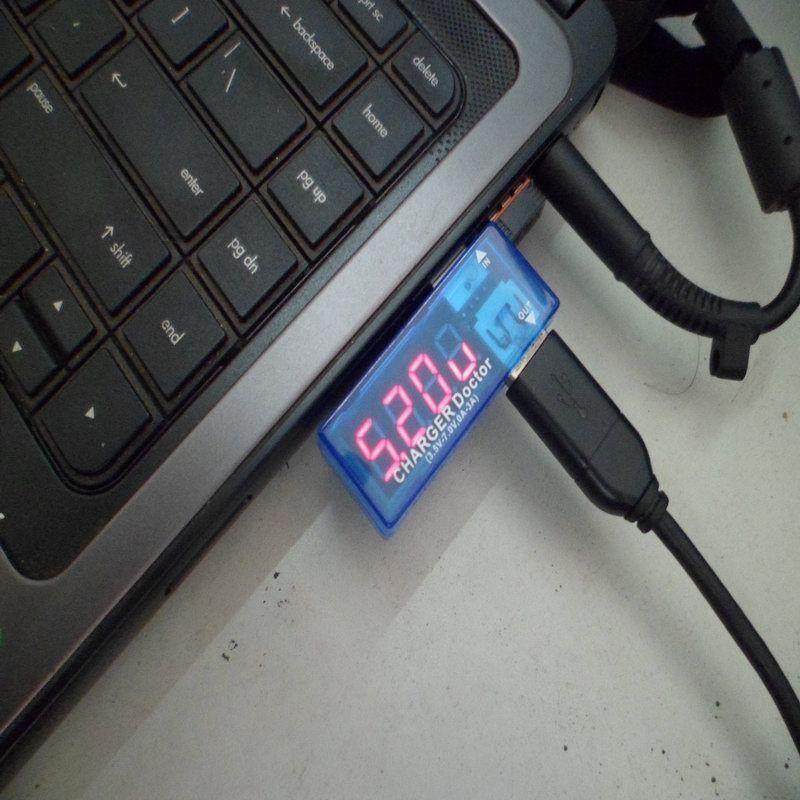
The USB Charger Doctor is an inline voltage and current meter that lets you instantly measure the output of any USB port or charger. Simply plug it between your USB power source and your device — the built-in 7-segment LED display alternates between showing voltage (V) and current (A) readings. No batteries, no setup, no software required.
It's an essential diagnostic tool for anyone who works with USB-powered devices. Use it to verify that your charger is delivering the correct voltage, check how much current a device is drawing, identify weak or failing USB ports, and troubleshoot charging problems. The transparent blue case lets you see the internal PCB while protecting the electronics.
⭐ Key Features
- Instant Readings — Plug in and immediately see voltage and current on the built-in LED display
- Alternating Display — Automatically cycles between voltage (V) and current (A) readings
- Wide Measurement Range — Reads voltage from 3.5V to 7V and current from 0 to 3A
- High Resolution — Voltage resolution of 10 mV, current resolution of 1 mA
- No Power Source Needed — Powered directly from the USB connection being tested
- Transparent Pass-Through — All four USB lines (VCC, D+, D−, GND) pass through to the connected device
- Compact Inline Design — USB-A male plug on one end, USB-A female socket on the other
- Transparent Blue Case — See-through housing lets you view the internal PCB
📊 Specifications
| Parameter | Value |
|---|---|
| Voltage Measurement Range | 3.5V – 7.0V |
| Voltage Resolution | 10 mV (0.01V) |
| Current Measurement Range | 0 – 3A |
| Current Resolution | 1 mA (0.001A) |
| Current Sense Resistor | 0.05Ω (50 mΩ) inline shunt |
| Display | 4-digit 7-segment red LED |
| Display Mode | Alternates between voltage and current |
| Input Connector | USB Type-A male plug |
| Output Connector | USB Type-A female socket |
| Data Lines | D+ and D− pass through (transparent to data) |
| Power Supply | Powered from USB bus — no batteries required |
| Dimensions | Approx. 56 × 18 × 10 mm (2.2 × 0.71 × 0.39 inches) L × W × H |
💡 How It Works
- Plug the male USB-A end into any USB power source — a wall charger, laptop USB port, power bank, or USB hub.
- Plug your USB device or cable into the female USB-A socket on the other end of the Charger Doctor.
- Read the display — the 4-digit LED display automatically alternates between showing the voltage (in volts) and the current draw (in amps).
- Diagnose — compare the readings to expected values. A healthy USB port should show approximately 5.0V. Current draw depends on the connected device.
📝 Note: The current measurement uses a 0.05Ω shunt resistor in series with the power line. This causes a very small voltage drop (typically less than 0.15V at 3A) which is negligible for most applications.
🚀 How to Use
Testing a USB Wall Charger
- Plug the Charger Doctor's male end into the USB wall charger.
- Plug your phone's charging cable into the Charger Doctor's female end.
- Connect your phone to the cable.
- The display will show the charger's output voltage and how much current your phone is drawing.
Testing a Laptop USB Port
- Plug the Charger Doctor directly into a USB port on your laptop.
- Connect any USB device to the female end.
- Read the voltage to verify the port is delivering a stable 5V, and the current to see how much the device is drawing.
Testing a USB Power Bank
- Plug the Charger Doctor into the power bank's output port.
- Connect your device.
- Monitor the current draw to estimate how long the power bank will last, or verify it's delivering adequate current for fast charging.
🔧 Reading the Display
The display alternates between two readings every few seconds:
| Display Shows | What It Means | Example |
|---|---|---|
| Voltage (V) | The voltage being supplied by the USB source | 5.12 = 5.12 volts |
| Current (A) | The current being drawn by the connected device | 0.50 = 500 milliamps (0.5A) |
What to Expect — Typical Readings
| Scenario | Expected Voltage | Expected Current |
|---|---|---|
| Standard USB 2.0 port | 4.75V – 5.25V | Up to 0.5A |
| USB 3.0 port | 4.75V – 5.25V | Up to 0.9A |
| USB wall charger (1A) | 4.9V – 5.3V | Up to 1.0A |
| USB wall charger (2.1A) | 4.9V – 5.3V | Up to 2.1A |
| Phone charging (typical) | ~5.0V | 0.3A – 1.5A |
| Tablet charging (typical) | ~5.0V | 1.0A – 2.4A |
🎯 Typical Applications
- Verifying USB wall charger output voltage and current capacity
- Diagnosing slow-charging phones and tablets
- Testing laptop and desktop USB port output
- Measuring USB power bank output and capacity
- Checking USB cable quality (voltage drop under load)
- Monitoring current draw of USB-powered Arduino and Raspberry Pi projects
- Comparing charging performance of different chargers and cables
- Quality control testing of USB power supplies
- Educational tool for learning about voltage, current, and power
📦 What's in the Box
- 1x USB Charger Doctor Inline Voltage and Current Meter
⚠️ Important Notes
- This device measures standard USB 5V power only. It is not designed for USB-C Power Delivery (PD) or Qualcomm Quick Charge voltages above 7V.
- The maximum current rating is 3A. Do not use with devices that draw more than 3A.
- The 0.05Ω shunt resistor introduces a small voltage drop proportional to current draw. At 1A the drop is approximately 0.05V; at 3A it is approximately 0.15V.
- The display alternates between voltage and current — it does not show both simultaneously.
- Data lines (D+ and D−) pass through transparently, so the Charger Doctor does not interfere with data transfer or device charging negotiation.
- This is a measurement tool only — it does not regulate, limit, or modify the USB power in any way.
- Not suitable for measuring USB-C connections (different connector type).
Sold and supported by Envistia Mall. Ships from the USA. The manufacturer and Envistia LLC (dba Envistia Mall) are not responsible for any damages or losses resulting from the use of this product. Always follow proper electrical safety practices when working with electronic components. Specifications are based on manufacturer data and are subject to change without notice.
Share