SystemBase Multi-8U Combo — USB to 8-Port RS422/RS485 Serial Converter Adapter
SystemBase Multi-8U Combo — USB to 8-Port RS422/RS485 Serial Converter Adapter
No se pudo cargar la disponibilidad de retiro
📋 Overview
📦 Special-Order · Ships in 1–2 WeeksThe SystemBase Multi-8U Combo is a professional-grade USB to 8-port serial converter that instantly adds eight RS422/RS485 (Combo) serial ports to any Windows or Linux computer through a single USB 2.0 connection. With communication speeds up to 921.6Kbps, ±15kV surge protection on every port, and per-port TX/RX LEDs for real-time status monitoring, the Multi-8U Combo is built for demanding industrial and commercial serial communication environments.
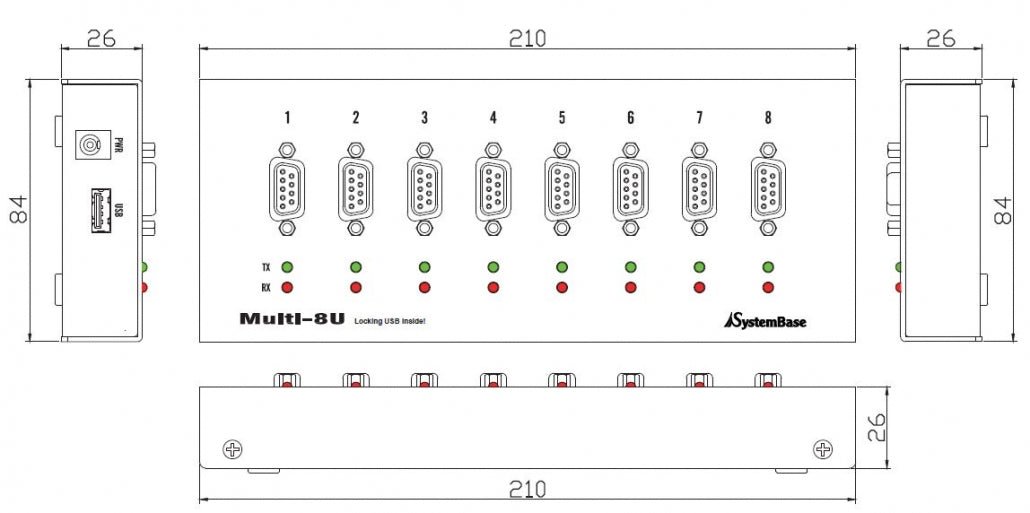
Each port features a standard DB9 connector and can be independently configured for RS422 (Point-to-Point or Multi-Drop) or RS485 (Echo or Non-Echo) mode using convenient DIP switches — no software configuration required. The unit is USB bus-powered and includes a latching USB connector for secure, vibration-resistant connections.
⭐ Key Features
- 8 Serial Ports from One USB Connection — Adds eight RS422/RS485 Combo serial ports through a single USB 2.0 port
- High-Speed Communication — Supports data rates up to 921.6Kbps for fast, reliable serial data transfer
- Flexible RS422/RS485 Modes — Each port is independently configurable via DIP switches: RS422 Point-to-Point, RS422 Multi-Drop, RS485 Non-Echo, or RS485 Echo
- ±15kV Surge Protection — Built-in ESD protection on every port safeguards connected equipment from electrical surges
- TX/RX LEDs Per Port — Real-time transmit and receive activity indicators on each of the 8 ports for easy diagnostics
- Auto Toggling — Automatic control of bus I/O direction for RS422/RS485 communication, simplifying half-duplex setups
- Slew-Rate Limit Control — Configurable slew-rate limiting reduces EMI and signal reflections for long cable runs (limits speed to 250Kbps when enabled)
- Termination Resistor Support — Built-in 120Ω termination resistors for RS422 and RS485 can be enabled via jumper settings
- +5V Power on Pin 9 — Optional external DC adapter allows +5V power delivery through pin 9 of each DB9 connector to power connected devices
- DB9 Male or Female Serial Connectors — Available with either DB9 Male or DB9 Female serial connectors
- Latching USB Connector — Secure locking USB connection prevents accidental disconnection in industrial environments
- Plug and Play — Automatically detected by Windows and Linux — no reboot required
- USB Bus-Powered — No external power supply required for standard operation
📊 Specifications
| Parameter | Detail |
|---|---|
| Number of Ports | 8 |
| Bus Interface | USB 2.0 |
| Serial Interface | Combo — RS422 / RS485 (switchable per port) |
| Controller | FT4232H |
| Serial Connector | DB9 Male or DB9 Female - Type selected above |
| Max Communication Speed | 921.6Kbps |
| RS422 Signals | TXD+, TXD−, RXD+, RXD− |
| RS485 Signals | TRXD+, TRXD− |
| Surge Protection | ±15kV ESD |
| Termination Resistor | 120Ω (RS422 and RS485, jumper-selectable) |
| LED Indicators | TX and RX per port (16 LEDs total) |
| Power Supply | USB VBUS (5V / 500mA) — external DC adapter optional |
| Pin 9 Power Output | +5V DC (requires external adapter, max 1A total) |
| Supported OS | Windows 7 / 8 / 10 / 11, Windows Server 2008+, Linux Kernel 2.6+ |
| Architecture Support | 32-bit and 64-bit |
| Dimensions | Approx. 210 × 84 × 26 mm (8.27 x 3.3 x 1 inches) L × W × H |
| Weight | Approx. 320g (11.3 oz) |
| Manufacturer | SystemBase Co., Ltd. |
🔧 Setup & Configuration
- Connect the USB cable — Plug the latching USB cable into the Multi-8U Combo and connect the other end to an available USB port on your computer. You should hear a click when the latch engages.
- Install the driver — Windows will attempt automatic driver installation. If needed, download the latest driver from the SystemBase website and install manually. Linux users should contact SystemBase technical support at tech@sysbas.com.
- Configure each port — Use the 2-position DIP switch on each port to select your desired mode: RS422 Point-to-Point (OFF/OFF), RS422 Multi-Drop (OFF/ON), RS485 Non-Echo (ON/OFF, default), or RS485 Echo (ON/ON).
- Set termination resistors (if needed) — Use the internal jumpers to enable the 120Ω termination resistor for RS422 or RS485 as required by your network topology.
- Connect your serial devices — Attach your RS422 or RS485 devices to the DB9 connectors and verify communication using the TX/RX LEDs.
💡 Tip: The slew-rate limit jumper defaults to disabled (10M mode, max 921.6Kbps). For long cable runs where signal integrity is a concern, enable the 250K slew-rate limit mode to reduce EMI and reflection waves.
📌 DIP Switch Settings
| SW1 | SW2 | Interface | Mode |
|---|---|---|---|
| OFF | OFF | RS422 | Point-to-Point |
| OFF | ON | RS422 | Multi-Drop |
| ON (Default) | OFF (Default) | RS485 | Non-Echo |
| ON | ON | RS485 | Echo |
📦 What's in the Box
- 1x SystemBase Multi-8U Combo (RS422/RS485) Converter - Serial connector type selected above
- 1x Latching USB Cable
- 1x Quick Start Guide
External DC power adapter is not included. Required only if supplying +5V power through DB9 pin 9.
This item ships from the manufacturer's existing factory stock rather than our own warehouse — which is why we can offer it at this price while still keeping delivery quick. We receive it first and ship it to you directly from Envistia Mall, with delivery typically taking ~1–2 weeks. Because it's ordered in specifically to fill your request, we're unable to modify, cancel, or return it once the order is placed. Have a question about compatibility or specs before you buy? Just message us — happy to help.
🔌 Compatible With
- Windows 7, 8, 8.1, 10, and 11 (32-bit and 64-bit)
- Windows Server 2008, 2012, 2016, 2019, 2022
- Linux (Kernel 2.6 and above — contact SystemBase for driver support)
- Any RS422 or RS485 serial device with DB9 connectivity
🎯 Applications
- Industrial automation and SCADA systems
- POS (Point of Sale) terminal networks
- Building management and access control systems
- Data acquisition and laboratory instrumentation
- Multi-device RS485 sensor networks
- Surveillance and security system integration
- CNC machine and PLC communication
- Telecommunications equipment management
⚠️ Important Notes
- The Multi-8U Combo model supports RS422 and RS485 only. If you need RS232 ports, look for the Multi-8U RS232 model.
- An external 5V DC adapter is required to supply power through pin 9 of the DB9 connectors. Without the adapter, pin 9 does not carry power.
- When using the slew-rate limit feature (250K mode), maximum communication speed is reduced to 250Kbps.
- For Linux driver support, contact SystemBase technical support at tech@sysbas.com.
- The latching USB connector provides a secure connection — press the spring button lightly and sweep to disconnect.
📄 Documentation & Resources
Share