

SystemBase sCAN Industrial RS232 to CAN Converter — CAN 2.0A/B, 1Mbps, DB9
SystemBase sCAN Industrial RS232 to CAN Converter — CAN 2.0A/B, 1Mbps, DB9
No se pudo cargar la disponibilidad de retiro
📋 Overview
📦 Special-Order · Ships in 1–2 Weeks
The SystemBase sCAN is an industrial-grade RS232 to CAN Bus converter built to bridge legacy serial equipment with modern CAN networks — without touching a single line of existing software. An onboard command-processing microcontroller interprets serial commands to configure the unit, and to transmit or receive CAN frames, so your existing system, PLC, or SCADA software talks to it exactly as it would talk to any other serial device.
Configuration, live monitoring, and firmware updates are all handled through CANView, SystemBase's free Windows utility, or through direct terminal commands over the COM port for systems that need to be scripted or automated. With a rugged aluminum housing, a -40°C to 85°C operating range, and ±15KV ESD protection on the CAN side, the sCAN is designed to keep running in cabinets, vehicles, and outdoor enclosures where consumer-grade adapters fail.
🎯 Applications — What Problems Does sCAN Solve?
Most facilities and vehicles still have serial-only equipment — legacy PLCs, meters, HMIs, sensors, or diagnostic tools — that now needs to talk to a CAN-based network. Ripping out and replacing that equipment is expensive and often unnecessary. The sCAN sits between the two worlds and does the translation transparently.
- Retrofitting legacy industrial equipment: Connect an older RS232-only controller, meter, or terminal to a modern CAN bus network without reprogramming the legacy device.
- Vehicle and mobile equipment diagnostics: Bridge an RS232 diagnostic laptop or data logger to a vehicle's CAN bus (engine, chassis, or telematics network) for monitoring and troubleshooting.
- Factory automation integration: Add a serial-based sensor, scale, or barcode reader into a CAN-based automation cell without a costly PLC card swap.
- Building and HVAC automation: Interface serial building controllers with CAN-based subsystems in automation and energy-management installations.
- Custom CAN network testing and development: Use CANView's built-in send/receive terminal to send test frames, monitor live CAN traffic, and log data to a TXT file for later analysis — useful for engineers validating a new CAN device or network segment.
- Noisy or unstable CAN networks: ABOR (Automatic Bus-Off Recovery) automatically restores communication after a bus-off event caused by wiring faults or electrical noise, without requiring someone to physically reboot the device — reducing downtime on unattended installations.
- High-traffic CAN networks: Hardware-level ID Masking lets the sCAN ignore irrelevant CAN frames at the hardware level, cutting the processing load on downstream systems that only need a subset of the traffic.
⭐ Key Features
- Bi-directional RS232 ⇄ CAN 2.0A / 2.0B signal conversion
- Onboard processor lets the CAN command set be modified in firmware, so the host system's software never needs to change
- CANView GUI utility for configuration, live testing, and firmware upgrades (Windows 7 through Windows 10/2012)
- ABOR (Automatic Bus-Off Recovery) for unattended, self-healing CAN communication
- Hardware-level ID Masking to filter unwanted CAN traffic and reduce processing load
- ±15KV ESD protection on the CAN side for electrically noisy industrial environments
- Flexible power input — draw power from the RS232 DB9 pin 9 or directly from CAN VBUS
- Wide -40°C to 85°C operating temperature range for industrial cabinets, outdoor enclosures, and vehicles
- Serial speeds up to 460.8kbps and CAN speeds up to 1Mbps
📊 Specifications
| Product Type | Industrial RS232 to CAN Converter |
| Serial Interface | DE9 (DB9) Female Socket, 1 port |
| Serial Max Speed | 460.8kbps |
| CAN Interface | DE9 (DB9) Male Plug, 1 port |
| CAN Max Speed | 1Mbps |
| CAN Standard | CAN 2.0A / 2.0B, ISO 11898-2 |
| CAN Signal Pins | CAN_H (pin 7), CAN_L (pin 2), VDD (pin 9), GND (pin 6) |
| ESD Protection | ±15KV on CAN side |
| Power Input | RS232 DB9 pin 9 and/or CAN VBUS |
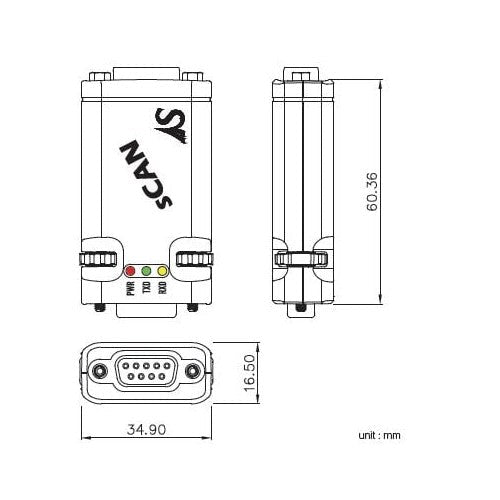
| Dimensions | Approx. 34.9 × 67.1 × 16.5 mm (1.37 × 2.64 × 0.65 inches) W × L × H |
| Weight | 23.3 g (0.9 ounces) |
| Configuration Utility | CANView (Windows 7 / Server 2008 / 8.1 / 10 / 2012) |
| Utility Features | Communication testing, configuration, firmware upgrade |
| Operating Temperature | -40°C to 85°C |
| Storage Temperature | -40°C to 85°C |
| Humidity | 5% to 95%, non-condensing |
📦 What's in the Box
- 1× SystemBase sCAN RS232 to CAN Converter
Note: RS232 cable, CAN cable, and power supply are not included and must be sourced separately based on your installation. The CANView configuration utility is provided as a free download from SystemBase and is not shipped on physical media.
This item ships from the manufacturer's existing factory stock rather than our own warehouse — which is why we can offer it at this price while still keeping delivery quick. We receive it first and ship it to you directly from Envistia Mall, with delivery typically taking ~1–2 weeks. Because it's ordered in specifically to fill your request, we're unable to modify, cancel, or return it once the order is placed. Have a question about compatibility or specs before you buy? Just message us — happy to help.
📌 Pinout / Pin Diagram
RS232 Side (DB9 Female):
- Pin 2: RXD
- Pin 3: TXD
- Pin 4: DTR
- Pin 5: GND
- Pin 6: DSR
- Pin 7: RTS
- Pin 8: CTS
- Pin 9: VDD (5V)
CAN Side (DB9 Male):
- Pin 2: CAN_L
- Pin 6: GND
- Pin 7: CAN_H
- Pin 9: VDD (5V)
🔧 Setup / Configuration
The sCAN uses a 4-position DIP switch on the underside of the unit to control power sourcing, operating mode, and bus termination:
- Switch 1: ON = use CAN VBUS as power source (default) / OFF = disable CAN VBUS power
- Switch 2: ON = use RS232 DB9 pin 9 as power source (default) / OFF = disable DB9 pin 9 power
- Switch 3: ON = Active Mode, normal operation (default) / OFF = Setup Mode, for configuring the device in CANView
- Switch 4: ON = enable 125Ω terminating resistor (default) / OFF = disable terminating resistor
To change communication settings, put the unit into Setup Mode, connect with CANView at the fixed setup baud rate (115200, 8N1), and use the Setup Mode tab to set serial parameters, CAN baud rate, CAN spec (2.0A or 2.0B), ID/Mask filtering, and ABOR/DAR options. Flip switch 3 back to ON to return to Active Mode for normal operation.
"sCAN can process up to 20 CAN frames per second." — SystemBase sCAN User Manual
💻 Software
CANView is a free GUI utility from SystemBase that handles all sCAN configuration, live CAN frame send/receive testing, and firmware upgrades over a serial COM port connection. It also includes automatic serial baud rate detection, which is helpful when a unit's current settings are unknown, and a built-in mini terminal that can log received CAN frames to a TXT file for later analysis.
💡 Tips
- Power only needs to be supplied to one side — either the RS232 port or the CAN port — not both.
- If sCAN is the last device on a CAN bus segment, enable the onboard 125Ω terminating resistor (DIP switch 4) to prevent signal reflections.
- For industrial-temperature operation, keep the RS232 baud rate at 460kbps or slower.
- Use ID Masking when only a subset of CAN traffic on a busy network is relevant — it reduces processing load on the connected host system.
🚫 Limitations
- Only one serial port and one CAN port per unit — this is a single-channel converter, not a multi-port gateway.
- CANView configuration software requires Windows 7 or later.
- Firmware upgrade file paths must use English characters only (no special characters or extended Unicode in the file path).
📄 Documentation & Resources
- Spec Sheet — Full technical specifications and pin diagram
- User Manual — Installation, CANView setup, firmware upgrade, and troubleshooting
- Manufacturer Product Page — Specifications, app notes, downloads
- All CAN Bus Converters
Sold and supported by Envistia Mall. This product ships from the United States. Envistia Mall and the manufacturer are not liable for damages or losses resulting from improper installation, incorrect wiring, or use outside the specified operating conditions. Always verify RS232 and CAN wiring, power source, and bus termination before connecting to live industrial or vehicle networks, and consult the User Manual for full setup and safety guidance.
Share