



W1209 12V Digital Thermostat Temperature Controller Module with NTC Sensor – Heating & Cooling Automation
W1209 12V Digital Thermostat Temperature Controller Module with NTC Sensor – Heating & Cooling Automation
Couldn't load pickup availability
Automate Temperature Control for Any DIY Project
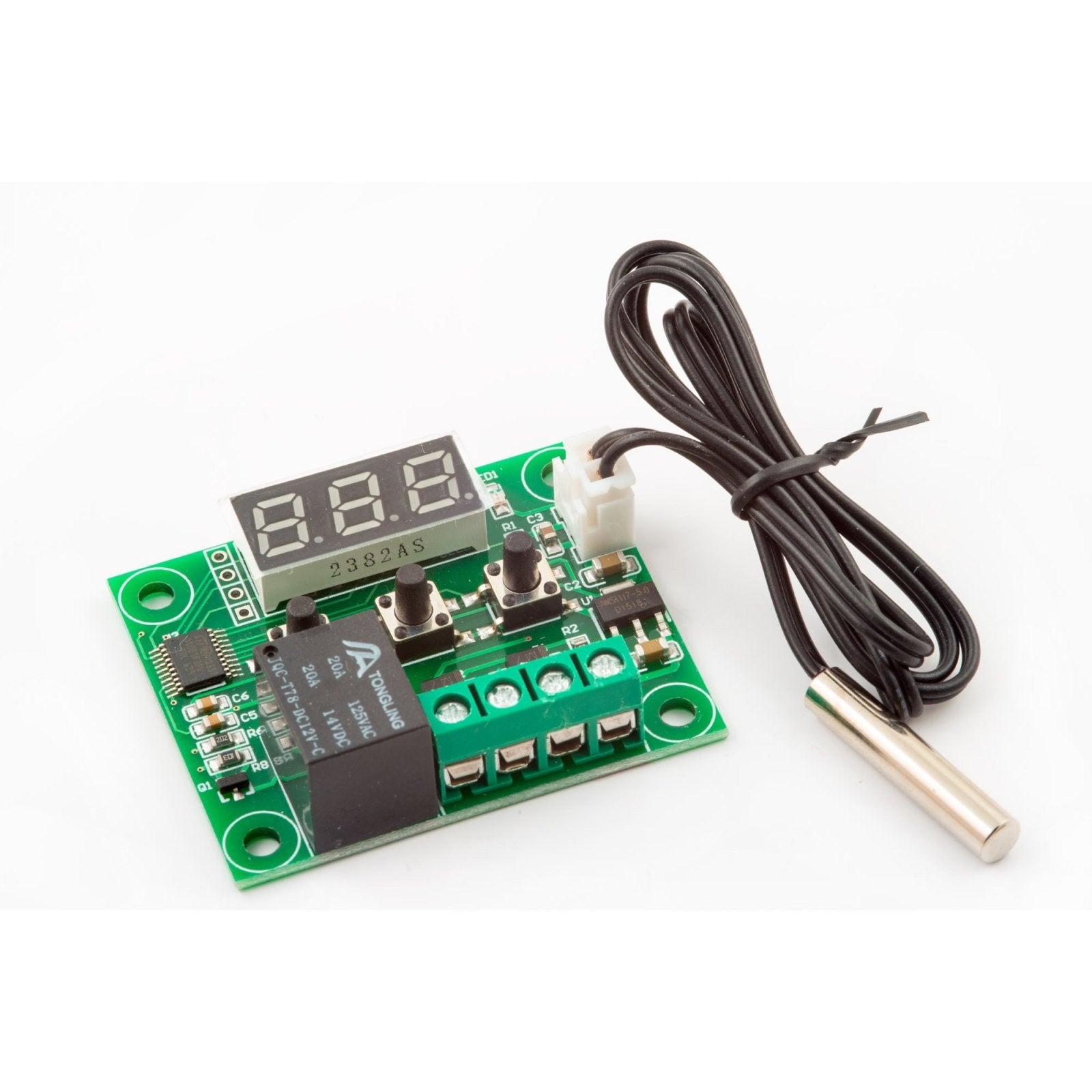
The W1209 Digital Thermostat Temperature Controller Module is a compact, self-contained solution for automating heating and cooling devices based on real-time temperature readings. Whether you're building a homebrew fermentation chamber, a reptile habitat controller, a greenhouse ventilation system, or a 3D printer enclosure heater, the W1209 gives you precise, programmable temperature control at a fraction of the cost of commercial thermostats.
Simply connect 12V DC power, wire your heating or cooling device to the onboard relay, plug in the included NTC temperature sensor, and set your target temperature. The module does the rest — continuously monitoring the ambient temperature and switching your device on or off to maintain your desired setpoint.
⚠️ NOTE: This is the standard 12V Version of the W1209 Temperature Controller
We also offer a 24V version, which requires 24V support power:
Why Choose This Module?
- Ready to use out of the box — Includes the controller board and a waterproof NTC temperature sensor probe with cable. No soldering, no additional components needed.
- Wide temperature range — Measures from -50°C to 110°C (-58°F to 230°F) with ±0.1°C resolution, suitable for freezer monitoring, incubation, fermentation, and high-heat applications.
- Powerful onboard relay — Switches loads up to 10A at 120VAC or 10A at 14VDC, enough to directly control fans, small heaters, solenoid valves, Peltier coolers, and more.
- Heating AND cooling modes — Configurable for either heating (relay ON when temp drops below setpoint) or cooling (relay ON when temp rises above setpoint) via a simple menu setting.
- Adjustable hysteresis — Set a temperature differential (1°C–15°C) to prevent rapid relay cycling, extending the life of your connected equipment.
- Bright LED display — Easy-to-read 3-digit display shows the current temperature at a glance, even in dim environments.
- Simple 3-button interface — Set/Menu, Increment (+), and Decrement (–) buttons make programming fast and intuitive. No complicated menus or manuals required.
- Compact footprint — Board measures just 48mm × 40mm — small enough to embed into enclosures, control panels, or project boxes.
- Temperature alarm — Configurable high and low temperature alarm thresholds alert you when conditions move outside your desired range.
- Sensor delay protection — Built-in delay setting prevents false triggering from momentary temperature fluctuations.
Popular Applications
| Application | Mode | How It Works |
|---|---|---|
|
🍺 Homebrew / Fermentation
|
Cooling
|
Activates a fan or cooler when wort temperature rises above target
|
|
🐍 Reptile / Terrarium Heating
|
Heating
|
Turns on a heat lamp or heat mat when enclosure cools below setpoint
|
|
🌱 Greenhouse / Grow Room
|
Cooling
|
Triggers exhaust fans when temperature exceeds threshold
|
|
🖨️ 3D Printer Enclosure
|
Heating
|
Maintains stable chamber temperature for ABS/ASA printing
|
|
🧊 Mini Fridge / Kegerator
|
Cooling
|
Controls compressor or Peltier module to maintain cold storage temp
|
|
🐔 Egg Incubator
|
Heating
|
Keeps incubation temperature steady for optimal hatch rates
|
|
🏠 Pipe Freeze Protection
|
Heating
|
Activates heat tape when ambient temp drops near freezing
|
|
🔧 Equipment Cooling
|
Cooling
|
Turns on cooling fans when electronics or machinery overheat
|
Technical Specifications
| Parameter | Value |
|---|---|
|
Supply Voltage
|
DC 12V (9V–12V operating range)
NOTE: The maximum input support voltage should not exceed 12V. In applications such as an automobile or RV where the battery voltage can exceed 12V, a regulator circuit or a 12V to 9V buck voltage converter with the input to the converter connected to the battery and the output to the W1209 will provide a stable 9V DC supply for the W1209 |
|
Temperature Range
|
-50°C to 110°C (-58°F to 230°F)
|
|
Measurement Accuracy
|
±0.1°C resolution
|
|
Temperature Sensor
|
NTC 10K thermistor (0.5% tolerance), waterproof probe
|
|
Relay Output
|
1 channel, 10A @ 120VAC / 10A @ 14VDC
|
|
Control Modes
|
Heating (H) or Cooling (C), user-selectable
|
|
Hysteresis Range
|
1°C to 15°C, adjustable
|
|
Display
|
3-digit red LED, 0.36"
|
|
Refresh Rate
|
0.5 seconds
|
|
Static Current
|
≤35mA
|
|
Operating Current
|
≤65mA
|
|
Board Dimensions
|
48mm × 40mm (1.9" × 1.6")
|
|
Operating Humidity
|
20%–85% RH (non-condensing)
|
Programmable Settings at a Glance
The W1209 features seven user-configurable parameters accessible through a simple long-press menu:
| Code | Setting | Range | Default |
|---|---|---|---|
|
P0
|
Heat / Cool Mode
|
H (Heat) / C (Cool)
|
H
|
|
P1
|
Hysteresis
|
1°C – 15°C
|
2°C
|
|
P2
|
Upper Temp Limit
|
—
|
110°C
|
|
P3
|
Lower Temp Limit
|
—
|
-50°C
|
|
P4
|
Temperature Correction Offset
|
-7°C to +7°C
|
0°C
|
|
P5
|
Relay Activation Delay
|
0 – 10 minutes
|
0 min
|
|
P6
|
High Temperature Alarm
|
—
|
OFF
|
Quick Start Guide
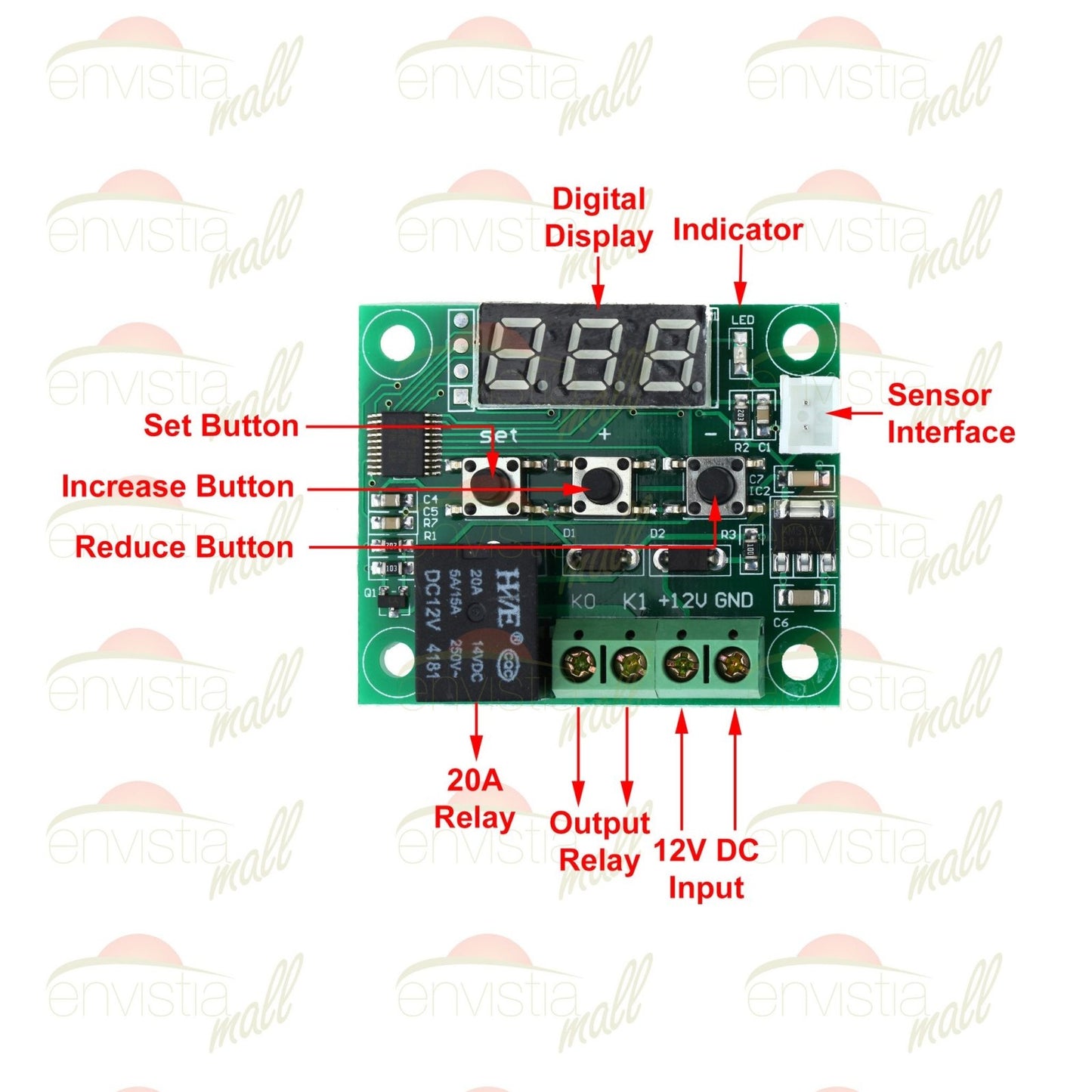
- Connect power: Wire 12V DC to the power input terminals (+ and –).
- Attach the sensor: Plug the NTC sensor probe into the 3-pin header on the board.
- Wire your load: Connect your heating or cooling device to the relay output terminals (K0 and K1). The relay acts as a simple on/off switch.
- Set your target temperature: Use the + and – buttons to set your desired temperature on the display.
- Configure mode: Long-press the SET button to enter the settings menu. Set P0 to H for heating or C for cooling.
- Done! The module will now automatically control your device to maintain the target temperature.
⚠️ Important: This is the 12V version. We also offer a 24V version that requires 24V DC input for proper operation. If you need a 24V version, please see our W1209 24V Digital Thermostat Controller.
📘 Full installation and programming instructions are available on our support page: W1209 Installation & Operating Instructions
Display Error Codes
| Code | Meaning |
|---|---|
|
LLL
|
Sensor disconnected or temperature below range
|
|
HHH
|
Temperature above measurable range
|
|
888
|
Sensor is disconnected. Plug a 10K NTC thermistor into the module
|
|
---
|
Sensor short circuit
|
Pro Tips
- Extend sensor cable carefully: The NTC sensor cable can be extended up to ~5 meters using shielded wire without significant accuracy loss. Beyond that, consider using a shorter run or adding a pull-up resistor for signal integrity.
- Use with a relay module for higher loads: While the onboard relay handles up to 10A, for high-power devices (space heaters, large compressors), use the W1209 relay output to trigger a higher-rated external relay or contactor.
- Calibrate with P4: If your sensor reads slightly high or low compared to a reference thermometer, use the P4 temperature correction offset (±7°C) to fine-tune accuracy.
- Mount in a ventilated enclosure: For long-term installations, house the board in a project box with ventilation holes to protect it from dust and moisture while allowing airflow to the board.
What's in the Box
- ✅ 1× W1209 Digital Thermostat Controller Board
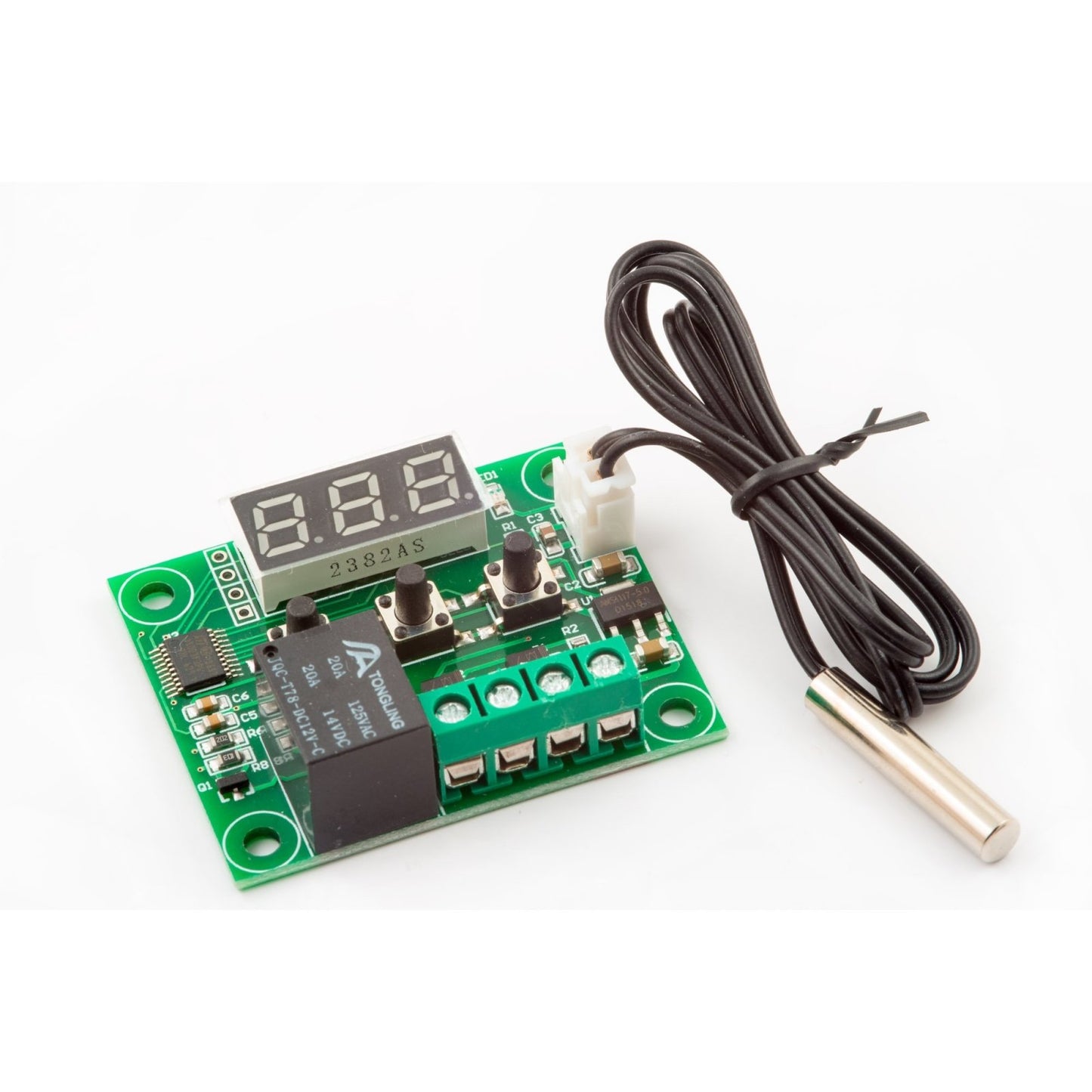
- ✅ 1× Waterproof NTC Temperature Sensor Probe with 0.5M (~18 inch) cable
Note: 12V DC power supply and load wiring are not included. A 12V battery or standard 12V DC adapter (minimum 1A recommended) is required for operation.
📄 Documentation & Resources
- User Manual & Hookup Guide (English)
- User Manual & Hookup Guide (Español/Spanish)
- All Temperature Measurement & Control Guides
Need a longer probe? See our 1 Meter long NTC Thermistor Probe that can be used with the W1209.
Want a W1209 with an acrylic plastic case: Click on this link to our W1209 with a case.
Share


- 5 stars: 36 (80%)
- 4 stars: 7 (16%)
- 3 stars: 2 (4%)
- 2 stars: 0 (0%)
- 1 star: 0 (0%)
Wonderful product, perfectly suited to my particular use of it.
works well but the setup was a bit confusing. Factory settings have a 2 degree offset so if you for example set the heat rise setting to 26 degrees, it won't actually activate until it reaches 28 degrees. Works fine. Thanks
Dose not have a "turn on when cold setting just works off then the temperature is too hot for the set temperature and then the relay with turn on.
The W1209 will operate in either Heating or Cooling mode. Parameter P0 sets it to either Heating (H) or Cooling (C) mode. See our support page at https://envistia.info/w1209-ds for more details and instructions on changing the parameters.
good for projects
I have this controller on a mountain top two way radio repeater controlling a 280 CFM fan to switch on or off depending on the temp of the TX and it has behaved wonderfully for around 7 months now. Recommended and a great value as well...
A very good deal for the price. Works well.
Fast shipper and good quality. Wish it had a built in 12 volt regulator.
Very small 2" wide and 1 1/2" tall but that's what I wanted.
Only had it for a week, already doing it’s job
Perfect for my needs. It is as described and would buy it again.
Good form factor, could use a case as an option,terminal connections a little fussy.Will see how durable it is over time.
Protect anything from the heat with a small amount of money.
An excellent product that functions as advertised. I couldn't be more pleased.
This is a nice thermostat. It works perfectly when powered by 9V – not 12V!One thing to note (and it's mentioned in the company's literature): don't feed it more than 12V. It will burn up (I know). It's really a 9V board, with the ability to handle voltages up to 12V, but no more!I ended up buying a second one after frying the first, and put a 9V buck converter in front of it. That solved the problem, and it now works perfectly.
After a couple weeks of operating an 8-amp resistive load it stopped working. Either the relay, PC board trace, or terminal strip overheated and fried, it was too burned to tell where the problem started. Price is good and the module works well, just watch out for high-power loads.
Great product perfect for my application
Great controller
Would have been perfect if it had the option to display/set in Degree F
It works well, although I have concerns about the low relay amperage rating. Because the rating on the relay is low, the neutral wire (not the line wire) must be used for the switch on the heater or fan...this is not the ideal way to switch anything with voltage that can kill. The proper way to switch something is to use the load wire and not the neutral wire. You don't want power thru the device when it is off. For the price is is great though. I would be willing to pay more for one with a higher rated relay though.
Great product, ready to use and easy to setup!
Bought this to help control the temperature of a 3D printer cabinet and it does a great job. Easy to wire up and use. Have only used one but it's working great. Printed my own case for it.
Excellent for DIY projects. It memorizes your settings even if the power is completely cut off.There are quite a few settings allowing you to calibrate, setting low/ high temperature, etc. I did not like that the length of the sensor was barely 30cm, but you can buy longer (search for NTC 10k) or just extend it yourself.It powers up and shows temperature as low as 5volts, however the relay seems to require at least 7volt to function reliably. I like the case that came with it. You have to put it together yourself, but if you're able to use this item, you'll have no problem putting this together. In case you're wondering: you just peel off the brown foil the plastic pieces come wrapped in. The case has openings, so you can still use the buttons and fasten/ loosen the wires without disassembling the case. Read full review
The case went together perfectly fine but the bolts that hold the board in and the case together were too short by a few threads
Fast shipping and Exactly as expected...As Expected for Chinese mass produced items. Some screws are too short, some too long, but it goes together and works as it should.
Very easy to use
Easy to wire. Easy to mount and works great!
Very neat thermostatic controller at a great price!
Very good product was what I expected .....
It worked as stated what more could you ask for. I bought several more for other jobs.
Great product did a great job on my refrigerator