SystemBase CS-LAN RS-232 Serial to Ethernet Converter
SystemBase CS-LAN RS-232 Serial to Ethernet Converter
No se pudo cargar la disponibilidad de retiro
Instantly connect RS-232 serial devices to your Ethernet network—no programming required.
The SystemBase CS-LAN is your professional-grade solution for bridging the gap between legacy serial equipment and modern IP networks. Whether you're managing industrial automation systems, point-of-sale terminals, or laboratory instruments, this compact converter delivers reliable plug-and-play connectivity.
Why Choose the CS-LAN?
🚀 Plug-and-Play Simplicity
No complex programming or driver installations. Configure everything through an intuitive web interface and get connected in minutes.
💪 Industrial-Grade Performance
Built to withstand harsh environments with an operating temperature range of -40°C to 85°C. Designed for 24/7 continuous operation in demanding industrial settings.
⚡ High-Speed Communication
Support for baud rates up to 921.6 kbps ensures fast, reliable data transfer for even the most demanding applications.
🔒 Enhanced Protection
Built-in 15kV IEC ESD protection safeguards your equipment from electrostatic discharge and power surges.
💰 Cost-Effective Solution
Extend the life of existing serial equipment without expensive hardware replacements. One affordable converter replaces costly system upgrades.
Complete Technical Specifications
Serial Interface
- Port: 1 x RS-232 (DB9 Male connector)
- Maximum Baud Rate: 921.6 kbps
- Supported Baud Rates: 300, 600, 1200, 2400, 4800, 9600, 19200, 38400, 57600, 115200, 230400, 460800, 921600 bps
- Data Bits: 5, 6, 7, 8
- Stop Bits: 1, 1.5, 2
- Parity: None, Even, Odd, Mark, Space
- Flow Control: Hardware (RTS/CTS), Software (XON/XOFF), None
- Signals: TXD, RXD, RTS, CTS, DTR, DSR, DCD, GND
Network Interface
- Ethernet Port: 1 x 10/100 Mbps Auto-MDIX (RJ-45)
- Network Protocols: TCP/IP, UDP, ARP, ICMP, DHCP Client, DNS
-
Operating Modes:
- TCP Server (listen for incoming connections)
- TCP Client (connect to remote host)
- UDP (broadcast/multicast support)
- IP Configuration: Static IP or DHCP
- Connection Management: Multiple simultaneous connections supported
Configuration & Management
-
Setup Methods:
- Web-based configuration interface
- Telnet console
- Windows configuration utility (PortView)
-
Software Included:
- COM Port Redirector (Virtual COM Port driver)
- PortView (Configuration utility)
- TestView (Testing and diagnostics)
- Status Indicators: LED indicators for Power, Link/Activity, Serial TX/RX
- Security: Password-protected configuration access
Power & Protection
- Power Input: 5V DC via included power adapter
- Power Consumption: < 2.5W (energy efficient)
- ESD Protection: Built-in 15kV IEC ESD protection
- Surge Protection: Integrated protection circuitry
Environmental Specifications
- Operating Temperature: -40°C to 85°C (-40°F to 185°F) - Industrial grade
- Storage Temperature: -40°C to 85°C
- Humidity: 5% to 95% RH, non-condensing
- Certifications: CE, FCC, RoHS compliant
Physical Specifications
- Dimensions: 85mm x 65mm x 25mm (3.35" x 2.56" x 0.98")
- Weight: Approximately 150g (5.3 oz)
- Mounting: Desktop or DIN-rail mountable (optional bracket available)
- Enclosure: Durable industrial-grade plastic housing
Real-World Applications
🏭 Industrial Automation & Manufacturing
- Connect PLCs, motor controllers, and sensors to SCADA systems
- Remote monitoring and control of production equipment
- Integration with building automation and energy management systems
- Factory floor data collection and analysis
🏥 Healthcare & Medical Equipment
- Network legacy diagnostic equipment and patient monitors
- Centralize data from laboratory analyzers and testing equipment
- Remote access to medical imaging devices
- Integration with hospital information systems
🏪 Retail & Point of Sale
- Connect barcode scanners, receipt printers, and cash drawers
- Integrate legacy POS terminals with modern networks
- Centralized management of multiple retail locations
- Inventory management and tracking systems
🔬 Laboratory & Research
- Network analytical instruments and data loggers
- Remote data collection from environmental sensors
- Integration with LIMS (Laboratory Information Management Systems)
- Automated testing and quality control systems
📡 Telecommunications & Networking
- Serial console access to routers, switches, and servers
- Remote management of telecom infrastructure
- Network monitoring and diagnostics
- Out-of-band management solutions
🚗 Transportation & Logistics
- Vehicle tracking and fleet management systems
- Warehouse automation and inventory control
- Access control and security systems
- Parking management and toll collection
⚡ Energy & Utilities
- Smart grid monitoring and control
- Remote meter reading systems
- Power distribution monitoring
- Environmental monitoring stations
What's in the Box
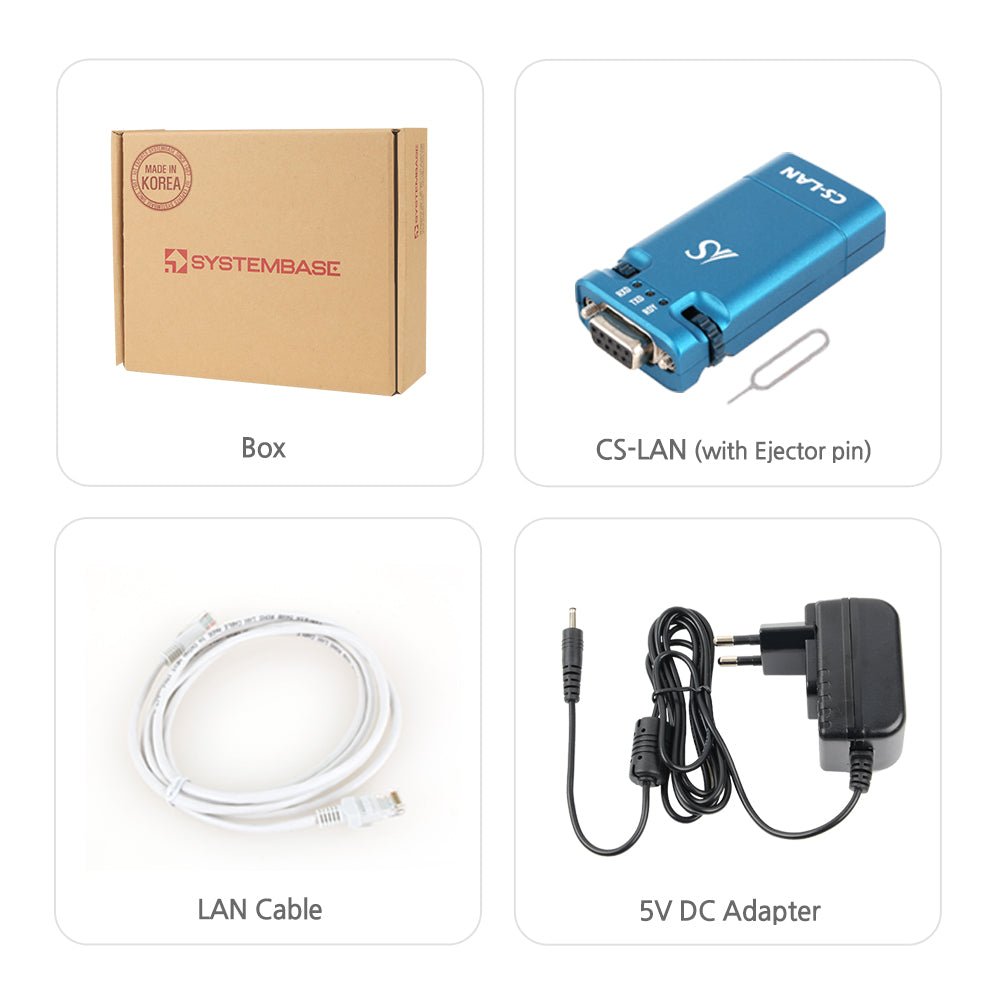
✓ CS-LAN Serial to Ethernet Converter (1 unit)
✓ 5V DC Power Adapter with regional plug
✓ Quick Start Guide for rapid deployment
✓ Ethernet cable
All software is available for download from the SystemBase website. See the link under the Technical Support & Resources section below.
Quick & Easy Setup
Step 1: Physical Connection
- Connect your RS-232 serial device to the DB9 port
- Plug in the Ethernet cable to your network
- Connect the 5V DC power adapter
Step 2: Network Configuration
- Access the built-in web server from any browser
- Set your IP address (static or DHCP)
- Configure serial port parameters (baud rate, data bits, etc.)
- Select operating mode (TCP Server, TCP Client, or UDP)
Step 3: Start Communicating
- Your serial device is now accessible over the network
- Use TCP/IP applications or install the Virtual COM Port driver
- Test connectivity using the included TestView software
Total setup time: Less than 5 minutes!
Advanced Features & Capabilities
Virtual COM Port Technology
The included COM Port Redirector software creates a virtual COM port on your Windows PC, making the network connection appear as a local serial port. Your existing serial applications work without any modification!
Flexible Operating Modes
TCP Server Mode:
- Device listens for incoming connections
- Multiple clients can connect simultaneously
- Ideal for applications where multiple computers need to access one serial device
- Configurable connection limits and timeouts
TCP Client Mode:
- Device initiates connection to a remote host
- Perfect for data logging and remote monitoring
- Automatic reconnection on network interruption
- Configurable retry intervals
UDP Mode:
- Broadcast or multicast data to multiple recipients
- Low-latency communication
- Ideal for real-time monitoring applications
Intelligent Data Handling
- Configurable packet timeout and size
- Data buffering for reliable transmission
- Automatic flow control management
- Support for binary and ASCII data
Network Discovery
The PortView configuration utility automatically discovers all CS-LAN devices on your network—no need to hunt for IP addresses or configure complex network settings.
Remote Management
- Web-based configuration accessible from anywhere on the network
- Telnet console for command-line management
- SNMP support for network monitoring integration
- Firmware updates via network (no physical access required)
Software Suite
COM Port Redirector
Creates virtual COM ports on Windows systems, allowing legacy serial applications to communicate over the network without modification. Supports Windows 7/8/10/11.
PortView Configuration Utility
Intuitive Windows application for:
- Automatic device discovery
- Easy configuration of network and serial parameters
- Firmware updates
- Device monitoring and diagnostics
TestView Testing Software
Comprehensive testing tool for:
- Serial port communication testing
- Network connectivity verification
- Data transmission monitoring
- Troubleshooting and diagnostics
Frequently Asked Questions
Q: What operating systems are supported?
A: The CS-LAN works with any operating system that supports TCP/IP networking (Windows, Linux, macOS, Unix, etc.). The Virtual COM Port driver and configuration utilities are Windows-only, but the web interface works in any modern browser.
Q: Can multiple computers access the serial device at the same time?
A: Yes, in TCP Server mode, multiple clients can connect simultaneously. However, you can configure whether they share access or queue for exclusive access to prevent data conflicts.
Q: What's the maximum cable distance for RS-232?
A: Standard RS-232 supports up to 50 feet (15m). For longer distances, use high-quality shielded cable or consider RS-422/485 converters which support distances up to 4,000 feet.
Q: Does it work with non-standard baud rates?
A: Yes, the CS-LAN supports standard and non-standard baud rates from 300 to 921,600 bps.
Q: Can I use this in outdoor or harsh environments?
A: The CS-LAN is rated for industrial temperatures (-40°C to 85°C) and can handle harsh environments. For outdoor use, ensure it's protected from direct water exposure (it's not waterproof).
Q: Does it support Power over Ethernet (PoE)?
A: No, the CS-LAN requires external 5V DC power. However, SystemBase offers the sLAN/All PoE model if you need PoE capability.
Q: How do I update the firmware?
A: Firmware updates can be performed remotely via the web interface or PortView utility—no physical access required.
Q: What if my application requires RS-422 or RS-485?
A: The CS-LAN is RS-232 only. For RS-422/485, check out our other Serial to Ethernet converters.
Q: Is there a limit to data throughput?
A: The CS-LAN can handle continuous data streams at full baud rate (up to 921.6 kbps) with minimal latency, making it suitable for high-throughput applications.
Q: Can I monitor the connection status remotely?
A: Yes, the web interface provides real-time status monitoring, and the device supports SNMP for integration with network monitoring systems.
Q: Is PoE (Power over Ethernet) supported?
A: No, the CS-LAN requires external 5V DC power via the included adapter. For A PoE-powered Serial to Ethernet Converter, see the SystemBase sLAN/All PoE.
Technical Support & Resources
Need help? Contact our technical support team at support@envistiamall.com
Share