

SystemBase sCAN/all-FD RS232/RS422/RS485 to CAN/CAN-FD Converter
SystemBase sCAN/all-FD RS232/RS422/RS485 to CAN/CAN-FD Converter
No se pudo cargar la disponibilidad de retiro
📋 Overview
📦 Special-Order · Ships in 1–2 Weeks
The SystemBase sCAN/all-FD is a high-performance industrial converter that bridges serial communication (RS232, RS422, or RS485 — user-selectable) to both Classical CAN and CAN-FD networks. Unlike the standard sCAN, which is RS232-only and Classical CAN-only, the all-FD model uses SystemBase's newly developed ALL Transceiver (SB300) to support any of the three serial standards from the same terminal block, and adds full CAN-FD (Flexible Data Rate) support alongside Classical CAN 2.0A/B.
Configuration, live testing, and firmware upgrades are handled through the dedicated CAN-FD Utility for Windows. With an industrial -40°C to 85°C operating range, ±15kV ESD protection, and built-in error-checking with DAR and ABOR options, the sCAN/all-FD is built for factory automation, robotics, and vehicle/industrial systems where reliability and higher CAN throughput both matter.
🔀 CAN vs. CAN-FD — What's the Difference?
If you're not sure whether you need Classical CAN or CAN-FD, here's the short version: CAN-FD is a newer, faster, higher-capacity evolution of the same CAN network your equipment already uses — and this converter supports both, so you don't have to choose in advance.
- Data payload: Classical CAN carries up to 8 bytes of data per frame. CAN-FD (Flexible Data Rate) carries up to 64 bytes per frame — 8x more data in a single message.
- Speed: Classical CAN tops out at 1Mbps. CAN-FD keeps the same 1Mbps (or lower) arbitration phase for network compatibility, but switches to a much faster 1–8Mbps data phase once arbitration is complete — so large amounts of data move significantly faster.
- Why it matters: As modern equipment adds more sensors, drives, and control loops to a single CAN network, Classical CAN's small payload and speed ceiling can become a bottleneck. CAN-FD was developed specifically to remove that bottleneck without abandoning the reliability of the CAN standard.
- Compatibility: CAN-FD controllers can receive Classical CAN messages, but Classical CAN-only nodes cannot understand CAN-FD frames — they'll register them as communication errors. If you're mixing CAN-FD and Classical CAN devices on the same bus, this is important to plan around.
Because the sCAN/all-FD auto-detects and supports both frame types, it works whether your equipment is Classical CAN, CAN-FD, or a mix of both on separate segments.
🎯 Applications — What Problems Does sCAN/all-FD Solve?
This converter is built for situations where either the serial interface, the CAN speed/payload, or both, don't fit a standard converter.
- PC-based CAN-FD monitoring and analysis: Connect a PC's serial port to CAN ECUs or CAN-FD equipment to monitor live traffic, capture logs, and diagnose issues using the CAN-FD Utility.
- PLC-driven motor, servo, and robot control: Bridge a PLC's RS232 or RS485 output to a CAN-FD network controlling motors, servo drives, or robotic equipment — common in factory automation cells.
- Retrofitting equipment with an unusual serial interface: Since RS232, RS422, and RS485 are all selectable from the same unit, one converter covers legacy RS232 gear, long-distance RS422 runs, and multi-drop RS485 networks — no need to stock three different converter models.
- High-bandwidth CAN applications: When a system generates more data per message or needs faster throughput than Classical CAN's 8-byte/1Mbps ceiling allows, CAN-FD's larger payload and higher data-phase speed removes that bottleneck.
- Noisy or unstable CAN/CAN-FD networks: ABOR (Automatic Bus-Off Recovery) and DAR (Disable Auto Retransmission) reduce network congestion and speed recovery when errors occur — useful for unattended industrial installations.
- Mixed CAN and CAN-FD environments: Since the converter auto-detects Classical CAN and CAN-FD frames, it can be deployed across systems that use either standard, or plan to migrate from one to the other.
⭐ Key Features
- All-in-one serial support — RS232, RS422, or RS485 selectable from the same terminal block
- Supports both Classical CAN (2.0A/B) and CAN-FD (Flexible Data Rate)
- CAN speed up to 1Mbps; CAN-FD data phase speed up to 8Mbps
- Serial communication speed up to 921.6kbps
- CAN-FD payload up to 64 bytes per frame (vs. 8 bytes for Classical CAN)
- Dedicated CAN-FD Utility for Windows — device configuration, communication testing, and firmware upgrade from one screen
- DAR (Disable Auto Retransmission) and ABOR (Automatic Bus-Off Recovery) options for network reliability
- Standard and Extended CAN ID filtering (11-bit and 29-bit) with configurable ID/Mask
- ±15kV ESD protection (HBM) plus EFT and Surge protection standards
- -40°C to 85°C industrial operating range
- Powered via 5V DC adapter or CAN VDD terminal (not simultaneously)
📊 Specifications
| Product Type | Industrial RS232/RS422/RS485 to CAN/CAN-FD Converter |
| Serial Standard | RS232 / RS422 / RS485 (user-selectable) |
| Serial Port | 1 port, 3.81mm pitch 5-pole terminal block with plug |
| Serial Max Speed | 921.6kbps |
| Serial Signals | RS232: TXD, RXD | RS422: TXD+/-, RXD+/- | RS485: TRXD+/- |
| CAN Standard | ISO 11898-1:2015, ISO 11898-2:2016 |
| CAN Specification | Classical CAN (2.0A/B) and CAN-FD |
| CAN Frame Format | Standard 11-bit ID / Extended 29-bit ID |
| CAN Port | 1 port, 3.81mm pitch 5-pole terminal block with plug |
| CAN Max Speed | 1Mbps (Classical CAN / CAN-FD arbitration phase) |
| CAN-FD Max Data Rate | 8Mbps (data phase, with Bit Rate Switching) |
| CAN Signals | CAN_H, CAN_L, VDD+, GND |
| ESD Protection | ±15kV (HBM) |
| Protection Standards | KS C 9610-4-2 (ESD), KS C 9610-4-4 (EFT), KS C 9610-4-5 (Surge) |
| Power Requirement | 5V 1A DC input, approx. 0.5W consumption; via DC adapter jack or CAN VDD terminal (not both simultaneously) |
| Power Connector | Outer Ø3.5mm, Internal Ø1.35mm barrel jack |
| Dimensions | Approx. 54 × 72 × 28.4 mm (2.13 × 2.83 × 1.12 inches) W × L × H |
| Weight | Product weight approx. 100g (gross weight approx. 261g) |
| Configuration Utility | CAN-FD Utility (Windows 10 or later) |
| Utility Functions | Device configuration, communication testing, firmware upgrade |
| LED Indicators | RDY (Red), DATA (Green), ERR (Red) |
| Operating Temperature | -40°C to 85°C |
| Storage Temperature | -40°C to 85°C |
| Humidity | Max. 90% R.H., non-condensing |
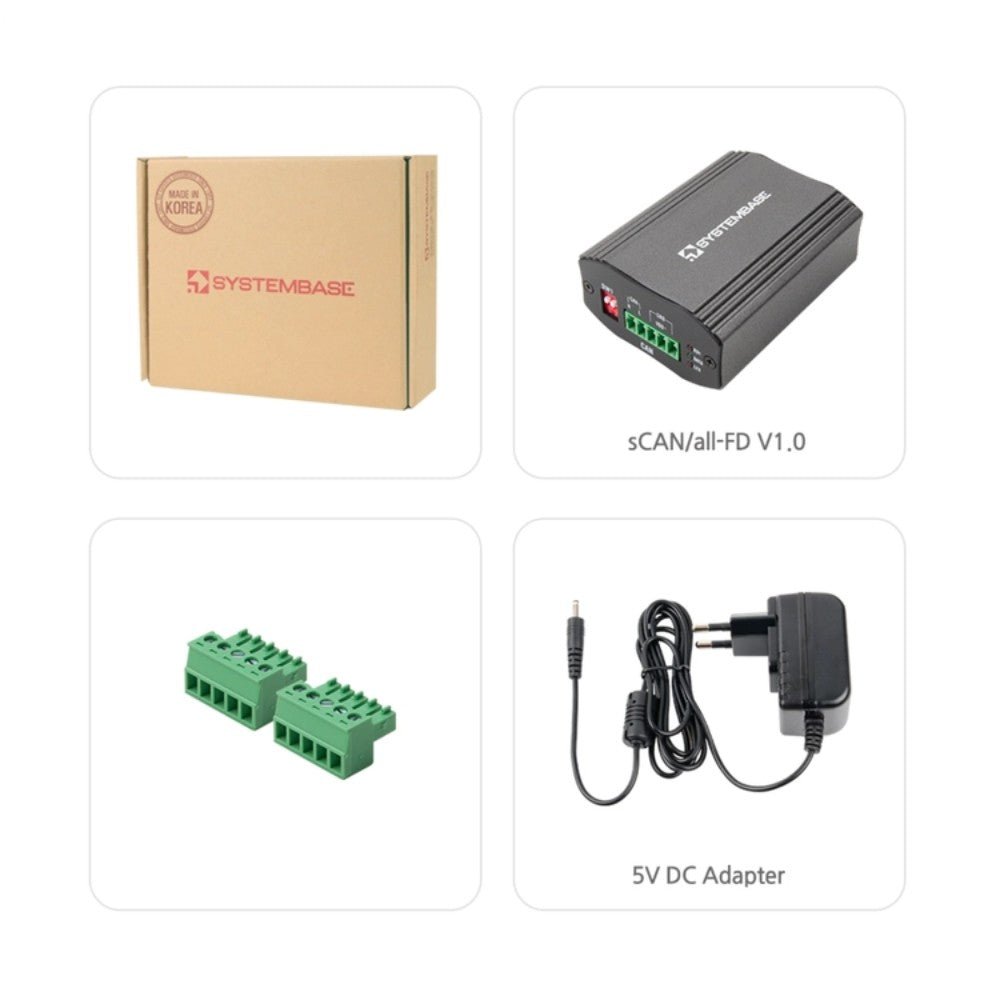
📦 What's in the Box
- 1× SystemBase sCAN/all-FD Converter
- 1× 5V 1A DC Adapter
- 2× Terminal Blocks (Serial and CAN)
This item ships from the manufacturer's existing factory stock rather than our own warehouse — which is why we can offer it at this price while still keeping delivery quick. We receive it first and ship it to you directly from Envistia Mall, with delivery typically taking ~1–2 weeks. Because it's ordered in specifically to fill your request, we're unable to modify, cancel, or return it once the order is placed. Have a question about compatibility or specs before you buy? Just message us — happy to help.
📌 Pinout / Pin Diagram
Serial Terminal Block (interface selected in CAN-FD Utility):
- RS232: TXD, RXD, GND
- RS422: TX+, TX-, RX+, RX-, GND
- RS485: TRX+, TRX-, GND
CAN Terminal Block:
- CAN_H, CAN_L
- GND, VDD+ (power input option)
🔧 Setup / Configuration
The sCAN/all-FD uses two 2-position DIP switch banks on the case:
-
SW1 (CAN Port Switch):
- Switch 1: ON = Active Mode (default) / OFF = Setup Mode (for use with CAN-FD Utility)
- Switch 2: ON = CAN 120Ω termination resistor enabled (default) / OFF = disabled
-
SW2 (Power Selection Switch):
- Switch 1: ON = DC-Jack power enabled (default) / OFF = disabled
- Switch 2: ON = CAN VDD power enabled / OFF = disabled (default)
Important: Do not enable the DC-Jack power and CAN VDD power at the same time — supplying power from both sources simultaneously may cause serious damage to the product or the power source.
To change settings, set SW1 switch 1 to OFF (Setup Mode), connect the serial terminal block to a PC via RS232 (fixed at 115200, 8N1 in Setup Mode), and open the CAN-FD Utility. Select Device → sCAN/all-FD, choose the COM port, and click Connect (Setup tab) to access the Setting Page. From there you can configure CAN arbitration and data phase baud rates, standard/extended ID filters, DAR/ABOR options, and the serial interface, baud rate, and termination settings — then click Save. Switch SW1 switch 1 back to ON (Active Mode) to apply your changes and resume normal operation.
💻 Software
The CAN-FD Utility is SystemBase's Windows configuration tool for the sCAN/all-FD, eCAN-FD, and uCAN/Analyzer-FD product line. It provides a Setting Page for CAN and serial configuration, an Active Page for sending/receiving CAN and CAN-FD frames with real-time error status (TEC/REC/LEC) and logging (up to 2,000 real-time or 10,000 accumulated entries), and a Firmware update function accessible from the top menu in Setup Mode.
💡 Tips
- Never enable DC-Jack power and CAN VDD power at the same time — pick one power source only.
- If sCAN/all-FD is at the end of a CAN bus segment, enable the 120Ω termination resistor via SW1 switch 2; RS422/RS485 serial termination is set separately in the CAN-FD Utility's Serial Setting section.
- All CAN 2.0A/B nodes sharing the network with sCAN/all-FD must use the same Arbitration Baudrate (max 1Mbps) — only the Data Phase Baudrate can run faster in CAN-FD mode.
- Do not perform a firmware update while CAN data is actively being received on the CAN port — this can cause critical damage to the product.
🚫 Limitations
- Single serial port and single CAN port per unit — one interface must be selected in software (RS232, RS422, or RS485) rather than used simultaneously.
- CAN-FD Utility requires Windows 10 or later.
- This device is intended for industrial use (Class A) and is not intended for use in a home or residential environment.
- Classical CAN-only nodes cannot interpret CAN-FD frames and will register them as communication errors — plan network topology accordingly if mixing CAN and CAN-FD devices.
📄 Documentation & Resources
- Spec Sheet — Full technical specifications, dimensions, and pinout
- User Manual — CAN/CAN-FD overview, hardware setup, CAN-FD Utility configuration, and troubleshooting
- Manufacturer Product Page — Specifications, app notes, downloads
- All CAN Bus Converters
Sold and supported by Envistia Mall. This product ships from the United States. Envistia Mall and the manufacturer are not liable for damages or losses resulting from improper installation, incorrect wiring, applying power to both power sources simultaneously, or use outside the specified operating conditions. Always verify serial and CAN wiring, power source, and bus termination before connecting to live industrial or vehicle networks, and consult the User Manual for full setup and safety guidance.
Share